
what is unicode and non-unicode system in SAP
Unicode : Multi language support
Non Unicode : single language support
Unicode supports all multiple languages like english, chainaa, german,..etc.
Nonunicode :only supports two languages i.e english and german.
After NetWeaver and ECC 5.0 and etc. supports unicode kernel.
Unicode provides a unique number for every character, no matter what the platform, no matter what the program, no matter what the language.
OLD Code pages have the following disadvantages!
* Unicode is mandatory for SAP systems deploying JAVA applications.
* Many companies are adopting service oriented architecture standards providing
web services to enable global interoperability. these standards require Unicode.
Non Unicode : single language support
Unicode supports all multiple languages like english, chainaa, german,..etc.
Nonunicode :only supports two languages i.e english and german.
After NetWeaver and ECC 5.0 and etc. supports unicode kernel.
Unicode provides a unique number for every character, no matter what the platform, no matter what the program, no matter what the language.
OLD Code pages have the following disadvantages!
- They cover only a subset of all characters.
- Different codepages have incompatibilities between each other.
- Data exchange is restricted between code pages. there are simply to many code pages.
- Unicode has the cabaility to support all the languages in the world in one code page!
- it support 65,000 characters and has room to support an additional 1 million characters.
* Unicode is mandatory for SAP systems deploying JAVA applications.
* Many companies are adopting service oriented architecture standards providing
web services to enable global interoperability. these standards require Unicode.
SAP Kernel Upgradation in Windows
Download the latest Kernel files.
Login to the Server
through OS level with SIDadm.
Make the copies of the
existing folders in the backup folder :-
Drive:\usr\sap\SID\SYS\exe
Stop the SAP Instance
& Services
SAPSID_00
SAPSID_01
SAPHostControl
SAPHostExec
Extract the SAR
Files
Go to command prompt
Go to as above path & Extract the files
c:\sapcar –xvf *.sar
Copy and paste the uncared
files to \usr\sap\SID\SYS\exe\uc\NTAMD64\ .
Select the option copy and
Replace if it prompts pop message as
“There
is already a file with same name in the location.”
Start the SAP services and Instances
Check the updated kernel from
Command Prompt by giving disp+work.
What is saproot.sh in SAP
What is saproot.sh?
saproot.sh is used to configure the ownership and permissions of some kernel files (BRTOOLS), including the SAPOSCOL. We have to execute the saproot.sh script after we have performed the kernel upgrade. The script need to be execute under root user and can be find under below location.
/usr/sapmnt/SID/exe
How to use
To execute the saproot.sh, just put the SAP system name (SID) and enter.
./saprootsh SID
saproot.sh is used to configure the ownership and permissions of some kernel files (BRTOOLS), including the SAPOSCOL. We have to execute the saproot.sh script after we have performed the kernel upgrade. The script need to be execute under root user and can be find under below location.
/usr/sapmnt/SID/exe
How to use
To execute the saproot.sh, just put the SAP system name (SID) and enter.
./saprootsh SID
SAP Kernel Upgrade in Linux unix system
The kernel upgrade activity on UNIX,
Linux environment.
Preparation:
First check current Kernel patch
release.
Step 1: Download the necessary kernel patch from sap.
Step 2: First create
a new directory and transfer
the kernel files
SAPEXE.SAR,SAPEXEDB.SAR with
SAPCAR,use winscp software.
Step 3: Take backup old kernel file to other
location.
Copy the old kernel.
cp
-pR /sapmnt/SID/exe/* /old kernel
Default kernel location : /sapmnt/SID/exe
Step 4: Login to the system as <SID>adm and
goto /new< kernel > directoryto uncar
the two
package.
SAPEXE.SAR,SAPEXEDB.SAR
Step 5: stop the SAP system.(stopsap R3)
Step 6: Login to the system as root user copy all extracted file into
/sapmnt/SID/exe
cp
-pR * /sapmnt/SID/exe/
step 7: After all files copied run the following command.(root user)
cd /sapmnt/SID/exe
./saproot.sh SID
Start & Stop SAP System in UNIX, Linux OS Environment
Starting the SAP System
1. Log on in your OS level as a user with SAP administrator authorization (<SID>adm).
2. Enter the command startsap [DB|R3|ALL]. The following applies to this command:
• DB starts the database system:
|
• R3 starts the instances & associated processes of the SAP System:
|
• ALL starts both the database system & the SAP System:
|
Stopping the SAP System
1. Log on in your OS level as a user with SAP administrator authorization (<SID>adm).
2. Enter the command stopsap [DB|R3|ALL]. The following applies to this command:
• DB stops the database system:
|
• R3 stops the instances & associated processes of the SAP System:
|
• ALL stops both the database system & the SAP System.
|
Operating System and Database Migration
Pre Export Process In Application level :-
Pre Export Process In OS level :-
Pre Export Process In DB level :-
Steps to Start the DB export
Import process
Some of the problems faced with the above mentioned source and target system
“Cannot connect to DB”
Solution: Delete the following R3load, R3szchk, R3ldctl from the Instal directory.
Process
Solution: Edit the DBEXPORT.R3S file and delete the lines DBCOMPUTESTAT4MIG_XT*,
DBCOMPUTESTAT4MIG*, BRCONNECTEXPSTAT*
Solution: Use the java based package splitter to split the STR files for the export.
Solution: Check the size of the PSAPTEMP before export. It should be atleast 2 times the size of the largest index for R/3.
Solution: We have used the mix server of 512 and max server of 1024 during the import process
Solution: Try using the PSAPUNDO in place of PSAPROLL
from the use of migmon between the source and the target.
Post Installation jobs for BASIS area
Reason for moving to Oracle 9.2.0.7
9.2.0.4 being the first stable release of R/3 had many bugs which are listed in the SAP and Oracle sites were later removed in later subsequent releases.
This oracle will be upgraded to Oracle 10.2.0.2 and for the upgrade the source should be at oracle 9.2.0.7 before it can be upgraded to 10g.
As we go higher up in the in the Optimizer gets improved hence the execution plans are improved and this results is transactions executing faster
Using of the Package splitter
The java based package splitter can be used to split the STR files
- Check the Java JRE version (Min 1.4.1).
- Check the QCM table entries of SAP.
- Check for cancelled and update task
- Delete table entries from TATGPC, TATGPCA
- Check the incremental table conversion
- Cancel all released jobs
- Check for the operation modes
- Delete unnecessary spool data
- De-schedule all SAP jobs
- Delete all the batch jobs
- Release all repairs and correction and transports
- delete background input logs
- Delete job logs
- Delete the tRFC
- Check for the code pages installed
- Check the DDIC password for 000 client
Pre Export Process In OS level :-
- Deschedule all OS DB backups
- Shutdown all external interface
- The source should have minimum SP3
Pre Export Process In DB level :-
- Update DB statistics
- Change the DB to no archive log mode
Steps to Start the DB export
- Enter the system as adm
- Create to directory in the source system eg, Export, Install
- Check for the PSAPTEMP, the size should be 2 times the largest index
- Start the R3setup.bat program from the kernel CD (use the 45B_EXT kernel cd for the migration as the target system is AIX 5.3, always check the PAM before using the kernel cd.)
- Edit the DBEXPORT.R3S file and skip the update of statistics as it is already done and update statistics of R3SETUP is high time consuming. It can even run for days for a DB size more than 1 TB
- Edit the DBEXPORT.R3S to stop for splitter
- Start the export
- The export stops at the given breakpoint for the splitter
- Split the STR files generated
- Repeat the export process
Import process
- Check the Java version ( Minimum JRE version 1.4.1 )
- Check all necessary drives and filesystems. ( #mkdir /oracle/client/92x_64, # cd /oracle/stage, #mkdir 920_64 )
- Create to directory eg, Install, Import
- From install directory run instool.sh of Ext. kernel cd for AIX.
- set environment.
- #csh
- #setenv LIBPATH /sapmnt//exe:/oracle//920_64/lib.
- Install the central instances. R3SETUP –f CENTRAL.R3S
- In the next installation process choose “Exit”
- Install Oracle software as per WAS640 guide with ora user.
- After the oracle installation is done repeat the installation of the R3SETUP
- The R3SETUP stops for Migration key check phase
- Create the tablespaces of the required sizes
- Restart the database in no archive log mode
- Start the import process
- Complete the post installation steps from the migration guide of 45 B
Some of the problems faced with the above mentioned source and target system
- During the export phase after the STR files are created the export stops with an error saying
“Cannot connect to DB”
Solution: Delete the following R3load, R3szchk, R3ldctl from the Instal directory.
- Use update of DB statistics by sapdba or brtools. Avoid using the update of statistics by the export
Process
Solution: Edit the DBEXPORT.R3S file and delete the lines DBCOMPUTESTAT4MIG_XT*,
DBCOMPUTESTAT4MIG*, BRCONNECTEXPSTAT*
- Export takes a huge time
Solution: Use the java based package splitter to split the STR files for the export.
- Export fails complaining the PSAPTEMP size is small.
Solution: Check the size of the PSAPTEMP before export. It should be atleast 2 times the size of the largest index for R/3.
- During the import process check the aio settings in the OS level.
Solution: We have used the mix server of 512 and max server of 1024 during the import process
- 6. The import process fails due to lack of space to extend the extent at PSAPROLL
Solution: Try using the PSAPUNDO in place of PSAPROLL
- 7. The total system downtime could be reduced if MIGMON was used. The firewall rule prevented
from the use of migmon between the source and the target.
Post Installation jobs for BASIS area
- Replace the disp+work of the kernel.
- Delete the table entries as mentioned in the Heterogeneous system copy guide of 45B
- Edit the RFC destination address of other connected system.
- Change the printer definition of the target. Test all the printers are working or we need to make changes in the settings.
- Set up the TMS
- Check for the ALE and IDOCS flow after the new system is up
- Schedule all the basic BASIS background jobs.
- Take a full offline backup
Reason for moving to Oracle 9.2.0.7
9.2.0.4 being the first stable release of R/3 had many bugs which are listed in the SAP and Oracle sites were later removed in later subsequent releases.
This oracle will be upgraded to Oracle 10.2.0.2 and for the upgrade the source should be at oracle 9.2.0.7 before it can be upgraded to 10g.
As we go higher up in the in the Optimizer gets improved hence the execution plans are improved and this results is transactions executing faster
Using of the Package splitter
The java based package splitter can be used to split the STR files
- Open new terminal preparation for splitter tool.
- Edit packet_splitter_end.properties file
- Use splitter guide for clarification.
- setenv JAVA_HOME /usr/opt/java141.
- using adm user, start split process.
BASIS BASIC
,
MSSQL
,
ORACLE
ABOUT
This web site is not affiliated with,sap,microsoft, All the contents are based on author’s day to day work administration and troubleshooting activities.
Find Sybase(ASE) Database version
Use the following command to determine the Sybase database version installed.
Select @@ version
go
Or use below command
sp_version
go
Select @@ version
go
Or use below command
sp_version
go
Start and Stop Max DB
Start and Stop Via DBMCLI
The dbmcli commands to start/stop MaxDB Instance.
Shutdown:
dbmcli –d <db_name> -u <dbm_user>,<password> db_offline
Restart:
dbmcli –d <db_name> -u <dbm_user>,<password> db_online
What is SAP ALV?
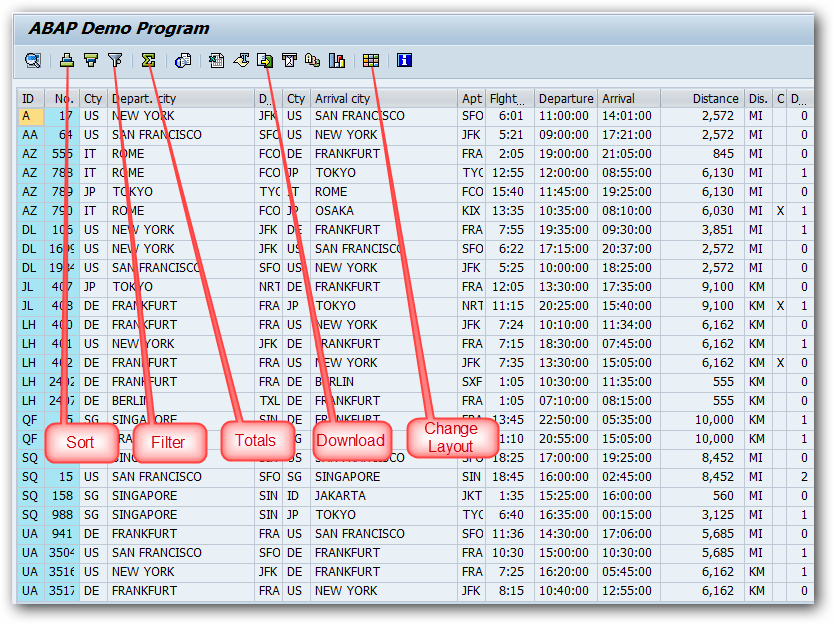
ALV stands for ABAP List Viewer. ALV gives us a standard List format and user interface to all our ABAP reports. ALV is created by a set of standard function modules provided by SAP.
ALV provides a lot of inbuilt functions to our reports and some of the functions are listed below.
- Sorting of records
- Filtering of records
- Totals and Sub-totals
- Download the report output to Excel/HTML
- Changing the order of the columns in the report
- Hide the unwanted columns from the report
Because of the above functions, ALV substantially decreases the report development time. ALV takes care of rendering the list and we can concentrate only on the data retrieval part.
Some of the function modules used to create ALV reports are listed below.
| FUNCTION MODULE | DESCRIPTION |
|---|---|
| REUSE_ALV_LIST_DISPLAY | Display an ALV list |
| REUSE_ALV_GRID_DISPLAY | Display an ALV grid |
| REUSE_ALV_COMMENTARY_WRITE | Output List header information |
| REUSE_ALV_VARIANT_F4 | Display variant selection dialog box |
| REUSE_ALV_VARIANT_EXISTENCE | Checks whether a variant exists |
| REUSE_ALV_FIELDCATALOG_MERGE | Create field catalog from dictionary structure or internal table |
Simple ALV report.
DATA: it_spfli TYPE TABLE OF spfli.

SELECT * FROM spfli INTO TABLE it_spfli.

CALL FUNCTION 'REUSE_ALV_GRID_DISPLAY'
  EXPORTING
    i_structure_name = 'SPFLI'
  TABLES
    t_outtab         = it_spfli.
Simple ALV Output List
SAP Transport Return Code Status
RC = 0, successfully imported.
RC = 4, imported ended with warning.
Common issue:
• Generation of programs and screens
• Columns missing and Rows missing.
Common issue:
• Generation of programs and screens
• Columns missing and Rows missing.
RC = 8, not imported ended with error
Common issue:
• Syntax error.
• Program generation error.
• Dictionary activation error.
• Method execution error.
Common issue:
• Syntax error.
• Program generation error.
• Dictionary activation error.
• Method execution error.
RC = 12, import is cancelled.
Common issue:
• Import is canceled due to object missing.
• Objects are not active.
• Program terminated due to job “RDDEXECL” is not working.
• Connection problem between system.
Common issue:
• Import is canceled due to object missing.
• Objects are not active.
• Program terminated due to job “RDDEXECL” is not working.
• Connection problem between system.
RC = 16, import is cancelled.
Common issue:
• Import cancelled due to system down while importing.
• Import cancelled due to user expires while importing
• Import cancelled due to insufficient roles.
Common issue:
• Import cancelled due to system down while importing.
• Import cancelled due to user expires while importing
• Import cancelled due to insufficient roles.
How to generate SAP Solman Key without having Solution manager
You might want to install SAP ECC 5 or SAP ECC 6 and been asking
SolmanKey. What if you don't have Solman Server ? Then how would you generate
solman key ? There are 2 ways (if you don't have Solman Server to generate
solman key) :
1. Ask your friend which have Solman Server to generate it. OR
2. Use this simple script (VB Script) to generate it.
' Solution Manager Key Generator '
Open Notepad and copy this Script and save it .vbs
'Save to SolManKeyGen.vbs and execute'
1. Ask your friend which have Solman Server to generate it. OR
2. Use this simple script (VB Script) to generate it.
' Solution Manager Key Generator '
Open Notepad and copy this Script and save it .vbs
'Save to SolManKeyGen.vbs and execute'
Dim SIDs, SNs, SERVs,
msg, ENDs, KEYs
msg="System ID (3 chr.)"
SIDs=InputBox(msg,"Solution Manager Key Generator")
msg="System Number (2 dig.)"
SNs=InputBox(msg,"Solution Manager Key Generator")
msg="Server Name (max. 15 chr.)"
SERVs=InputBox(msg,"Solution Manager Key Generator")
KEYs=SolManKeyGen(SIDs, SNs, SERVs)
msg="Solution Manager Key"
ENDs=InputBox(msg,"Solution Manager Key Generator",KEYs)
'-------------------------------------------------------
Function SolManKeyGen(SIDst, SNst, SERVst)
Dim SIDSNhex(5)
Dim SERVhex(15)
Dim reshex(5)
SIDSNstr = UCase(SIDst) + UCase(SNst)
SERVstr = UCase(SERVst)
For arrcnt = 1 To 5
SIDSNhex(arrcnt) = Asc(Mid(SIDSNstr, arrcnt, 1))
Next
For arrcnt = 1 To Len(SERVstr)
SERVhex(arrcnt) = Asc(Mid(SERVstr, arrcnt, 1))
Next
For arrcnt = Len(SERVstr) + 1 To 15
SERVhex(arrcnt) = 0
Next
If (Len(SERVstr) > 0) Then
If (Len(SERVstr) < 5) Then
For arrcnt = Len(SERVstr) + 1 To 5
SERVhex(arrcnt) = Asc(" ")
Next
End If
End If
If (Len(SERVstr) > 5) Then
If (Len(SERVstr) < 10) Then
For arrcnt = Len(SERVstr) + 1 To 10
SERVhex(arrcnt) = Asc(" ")
Next
End If
End If
If (Len(SERVstr) > 10) Then
If (Len(SERVstr) < 15) Then
For arrcnt = Len(SERVstr) + 1 To 15
SERVhex(arrcnt) = Asc(" ")
Next
End If
End If
For arrcnt = 1 To 5
reshex(arrcnt) = ((((0 Xor SIDSNhex(arrcnt)) Xor SERVhex(arrcnt)) Xor
SERVhex(arrcnt + 5)) Xor SERVhex(arrcnt + 10))
Next
reshex(1) = reshex(1) Xor 84 Xor 0
reshex(2) = reshex(2) Xor 131 Xor 11
reshex(3) = reshex(3) Xor 194 Xor 46
reshex(4) = reshex(4) Xor 52 Xor 105
reshex(5) = reshex(5) Xor 119 Xor 188
hexstr = "0123456789ABCDEF"
resstr = ""
For arrcnt = 1 To 5
hihex = reshex(arrcnt) \ 16
lohex = reshex(arrcnt) Mod 16
resstr = resstr + Mid(hexstr, hihex + 1, 1) + Mid(hexstr, lohex + 1, 1)
Next
SolManKeyGen = resstr
End Function
How to change the default SAP GUI client number
You need to change an instance profile parameter on the R/3 system.
Goto :TCODE RZ10,
Goto :TCODE RZ10,
login/system_client
The default value is 000.
Which Client you want change client value like 300,800,000,.
How to increase Dialog work process time in SAP
Goto transaction code RZ11, enter the parameter name – rdisp/max_wprun_time and press enter. Once you get the below screen, click on Change Value and enter the desired time. Please not to set the value to 0 as it will make the running time unlimited.
No restart required as the parameter is dynamically switchable. For permanent change, please do it on transaction code RZ10. You can refer to SAP Note 25528.
No restart required as the parameter is dynamically switchable. For permanent change, please do it on transaction code RZ10. You can refer to SAP Note 25528.
How to Modify SAP Transport Number Range
You want to change the transport number range on the SAP System.
SAP stored the last transport request in the table E070L. You can find the information using transaction code SE16 or SE16N.
Due to non-modifiable function on transaction code SE16/SE16N, you may need to update the table from database level. Below example is on Oracle database. If let say, the latest transport number from table E070L is SIDK800111 and you wanted to change to SIDK000121.
ABAP
,
BASIS
,
SAP Beginners
SAP Kernel Up-gradation in Windows Environment step by step
Step by Step Procedure for Kernel Up-gradation:
- Basis Administrator shall login to www.service.sap.com with OSS & password and download the latest Kernel files.
- Downloads---->SAP Support Packages---->Support packages & Patches-Entry By application group---->SAP application Components---->SAP ERP---->SAP ERP 6.0----> Entry By Component---->SAP ECC Server----> SAP KERNEL 7.20 EXT 64-BIT UC---->Windows Server on X64 64BIT---->MaxDB “SAPEXEDB_402-20006745.SAR” (Kernel Part II)
- Downloads---->SAP Support Package---->Support packages & Patches-Entry By application group---->SAP application Components---->SAP ERP---->SAP ERP 6.0---->Entry By Component---->SAP ECC Server---->SAP SAP KERNEL 7.20 EXT 64-BIT UC---->Windows Server on X64 64BIT---->#Database Independent “SAPEXE_402-20006748.SAR” (Kernel Part I).
2. Login to the Server through OS level with SIDadm.
3. Make the copies of the existing folders in the backup folder :-
- Drive:\usr\sap\SID\SYS\exe
4. Stop the SAP Instance & Services
- SAPSID_00
- SAPSID_01
- SAPHostControl
- SAPHostExec
5. Extract the SAR Files
- Go to command prompt
- Go to as above path & Extract the files
c:\sapcar –xvf *.sar
6. Copy and paste the uncared files to \usr\sap\SID\SYS\exe\uc\NTAMD64\ .
7. Select the option copy and Replace if it prompts pop message as “There is already a file with same name in the location.”
8. Start the services and Instances
9. Check the updated kernel from Command Prompt by giving disp+work.
Subscribe to:
Posts
(
Atom
)
